New Google Business Profile Verification Update
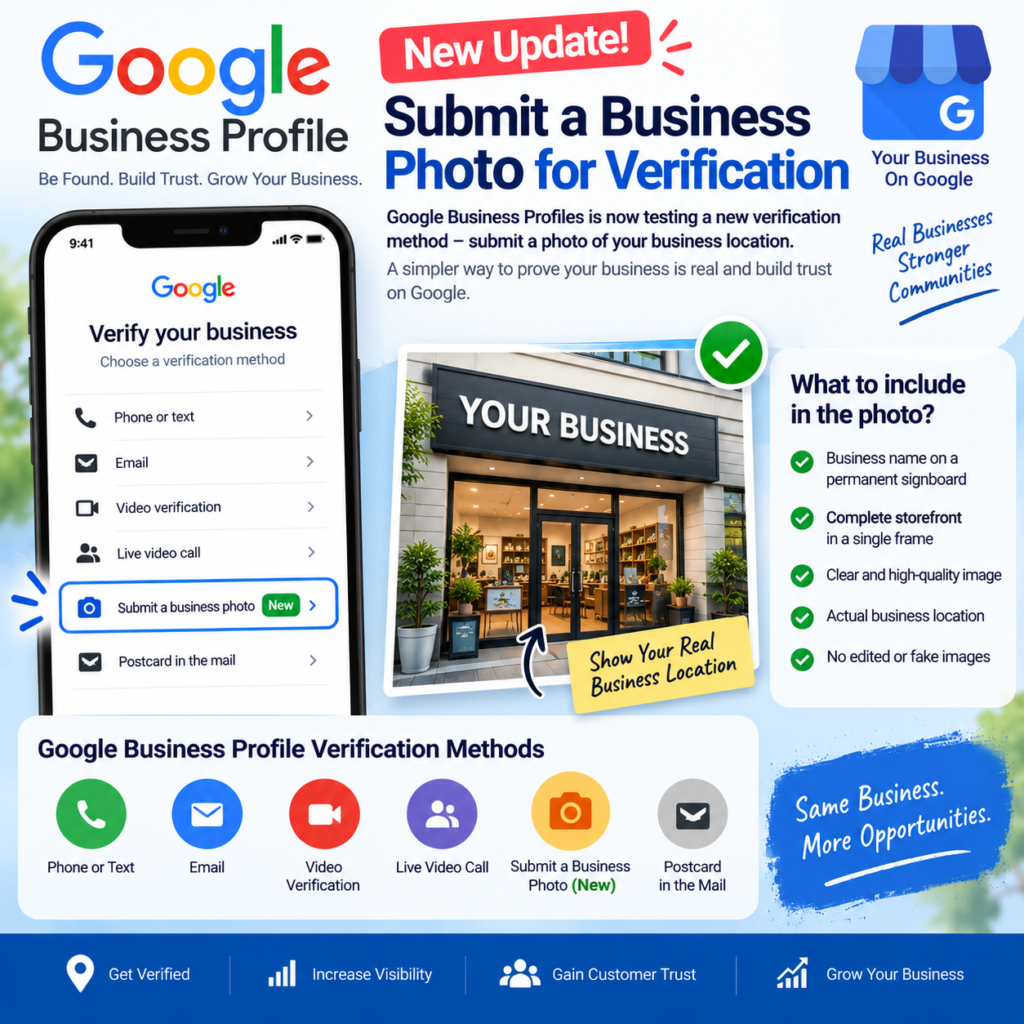
New Google Business Profiles Submit A Business Photo For Verification
Google Business Profiles may be introducing a new and potentially simpler way for businesses to verify their listings: Submit a business photo for verification .
Google Business Profile verification is an important step for business owners because it helps confirm that a business is legitimate and allows the owner to manage important information, including business details, customer interactions, photos, and other Profile features.
A new verification option recently spotted in the Google Business Profile interface suggests that some businesses may now be able to verify their location by submitting a photo of their business.
This could become an important development for local businesses and local SEO professionals.
A New “Submit a Business Photo” Verification Option
Local SEO expert Ben Fisher recently noticed a new option appearing for some Google Business Profiles called:
“Submit a business photo”
According to reports, this option appears to be an additional method that Google may use to verify whether a business is genuinely operating from the location listed on its Google Business Profile.
At the time of reporting, Google had not clearly added this specific verification method to its official verification documentation. This means the feature may currently be a limited rollout or test and might not yet be available to every business.
Google typically determines which verification methods are available for each Business Profile. The options can vary depending on factors such as:
Business category
Business type
Public information
Business location
Region
Operating hours
Other trust and verification signals
Because of this, business owners cannot necessarily choose any verification method they want. Google displays the methods available for the individual Business Profile.
What Are the Existing Google Business Profile Verification Methods?
Before this newly spotted business-photo option, Google Business Profile verification could include several methods, depending on eligibility.
These may include:
1. Phone or Text Verification
Some businesses can receive a verification code through a phone call or SMS sent to their business phone number.
2. Email Verification
Eligible businesses may receive a verification code through an email address displayed in the verification process.
3. Video Verification
Google may ask some business owners to record a video showing evidence of their business location, operations, and ownership.
4. Live Video Call
For some businesses, Google may require a live video call with a representative to demonstrate the business location and proof of management.
5. Postcard Verification
In some cases, Google may send a verification code through postal mail to the business address.
Google notes that verification methods are automatically determined, and in certain situations, a business may need to complete more than one verification step.
What Does Google Want to See During Business Verification?
Although Google has not yet fully documented the requirements for the newly spotted “Submit a business photo” option, reports suggest that the photo requirements may focus heavily on proving that the business genuinely exists at the listed location.
According to the latest information shared about the feature, the submitted image should show important details such as:
The business name displayed on a permanent sign or fixture
The storefront or business location
The entire storefront visible in a single frame
This is important because Google needs to connect the physical location shown in the image with the information displayed on the Business Profile.
Why a Clear Business Signboard May Be Important
A business signboard is one of the strongest visual signals that a physical business is operating at a particular location.
For businesses using the new photo verification option, it may be beneficial to ensure that the photo clearly shows:
✔ The exact business name
✔ Permanent exterior signage
✔ The physical storefront or office
✔ A clear view of the business location
✔ The surrounding structure where relevant
The business name shown on the signboard should ideally match the name listed on the Google Business Profile.
If the business operates from a physical storefront, taking a clear and wide photo that includes both the signboard and the complete storefront may provide stronger visual evidence.
How This Could Be Similar to Google’s Video Verification
The new business-photo verification method appears to follow the same general objective as Google’s existing video and live video verification processes: proving that the business is real, located where it claims to be, and managed by the person requesting access.
For live video verification, Google may ask a business owner to show evidence of:
Your Current Location
Business owners may need to show outside signs, nearby businesses, or street signs that help confirm the physical location.
Your Business or Equipment
Google may request evidence of products, branded equipment, marketing materials, or tools used to operate the business.
Proof That You Manage the Business
Business owners may need to demonstrate access to employee-only areas or business-related items such as a cash register, storage area, kitchen, keys, or other non-sensitive evidence of management.
The new photo-based method may potentially simplify this process for certain businesses by allowing Google to collect visual evidence through a single submitted image rather than requiring a longer video verification process.
However, until Google officially publishes detailed documentation, the exact requirements may vary.
Why This Update Could Be Significant for Local Businesses
Google Business Profile verification can sometimes be one of the biggest challenges for new businesses, especially when traditional verification methods are not available.
A photo-based verification option could potentially make the process more convenient for eligible businesses.
For example, a business owner may be able to demonstrate the existence of their physical location through a properly captured storefront image.
This could be especially useful for businesses that have:
A clearly branded storefront
Permanent business signage
A physical office or commercial location
A recognizable entrance
Clearly visible business branding
However, this does not necessarily mean that photo verification will be available to every business.
Google’s verification system is designed to select methods based on the individual Business Profile, and availability can differ from one business to another.
How to Prepare Your Business for Photo Verification
If you see the “Submit a business photo” option in your Google Business Profile, it is important to capture the image carefully.
Here are some best practices:
1. Make Sure the Business Name Is Clearly Visible
Your permanent business signboard should be readable in the photo.
Whenever possible, make sure the name displayed on the sign matches your Google Business Profile name.
2. Capture the Entire Storefront
Reports about the new option suggest that the entire storefront should be visible in a single frame.
Avoid submitting extremely close-up images that show only the business name.
3. Use a Clear and Well-Lit Image
Take the photo during good lighting conditions.
The image should be:
- Sharp
Well-lit
Easy to understand
Free from excessive filters
Not heavily edited
Google’s general Business Profile photo guidelines also recommend clear, high-quality images without significant alterations or excessive filters.
4. Show Permanent Business Fixtures
A permanent signboard or other fixed branding may provide stronger evidence than temporary banners or removable promotional material.
5. Avoid Screenshots or Edited Images
Use an original photograph taken at the actual business location.
Do not heavily edit, manipulate, or digitally alter the image.
What About Service-Area Businesses?
The requirements may be different for businesses that do not have a traditional customer-facing storefront.
Google has previously experimented with photo-based verification options for certain service-area businesses, including methods that could involve showing a business vehicle in the area where customers are served.
This indicates that Google may use different visual verification approaches depending on the type of business being verified.
For service-area businesses such as:
Website Design Services company
Plumbers
Electricians
Cleaning Services
Pest Control Companies
Repair Services
Google may potentially require different types of evidence compared with a retail store or office.
Is “Submit a Business Photo” Officially Available to Everyone?
At this stage, the answer appears to be no .
The option has been reported as appearing for some Business Profiles, but Google has not yet clearly documented it as a universally available verification method.
This means the feature could be:
A limited test
A phased rollout
Available only for selected business categories
Available only in certain regions
Based on Google’s internal verification signals
Business owners should not assume that they will automatically receive the photo verification option.
The available verification method will continue to depend on what Google displays for the specific Business Profile.
What This Means for Local SEO
This update is another reminder that Google is continuing to improve the way it verifies the legitimacy of local businesses.
Verification plays an important role in protecting Google Maps and local search results from:
Fake business listings
Duplicate listings
Incorrect business addresses
Misleading business information
Unauthorized profile ownership
For local SEO professionals and business owners, maintaining accurate business information and strong real-world branding is becoming increasingly important.
A properly maintained business location with:
Consistent business name
Permanent signage
Accurate address
Visible branding
Genuine business operations
can help create stronger trust signals for both customers and verification processes.
Final Thoughts
The newly spotted “Submit a business photo” option could become an important addition to Google Business Profile verification.
If widely rolled out, it may provide eligible businesses with a faster and simpler way to demonstrate that they operate from a genuine physical location.
The key takeaway for business owners is simple: keep your business information accurate and make sure your physical branding clearly represents the business listed on Google.
If this verification option appears on your Google Business Profile, consider submitting a clear, original photograph that shows your business name on a permanent sign and captures the complete storefront in one frame.
Since Google has not yet fully documented this verification method, the exact requirements and availability may change as the feature develops.
Businesses and local SEO professionals should continue monitoring Google Business Profile updates for official confirmation and further guidance.
Frequently Asked Questions
What is the new Google Business Profile photo verification method?
Google Business Profiles appears to be testing or rolling out a verification option called “Submit a business photo.” It may allow eligible businesses to submit a photograph of their business location as part of the verification process.
What should be visible in the business photo?
Based on current reports, the photo should show the business name on permanent signage and capture the complete storefront in a single frame. Requirements may change as Google provides more official information.
Can every business use photo verification?
No. Google determines available verification methods automatically based on the individual Business Profile and several other factors.
What other Google Business Profile verification methods are available?
Depending on eligibility, Google may offer phone or text, email, video verification, live video verification, or postcard verification.
Is the new business photo verification method officially documented by Google?
As of the latest reports, Google had not yet clearly added this specific option to its official verification documentation, which may indicate a limited test or early rollout.
Conclusion
The potential introduction of business photo verification represents another step in Google’s efforts to make local business listings more trustworthy while potentially simplifying verification for legitimate businesses.
For business owners, now is a good time to check that your Google Business Profile name, address, physical location, and business signage are accurate and consistent .
A strong and clearly identifiable physical presence may not only help customers find your business but could also become increasingly important as Google expands visual methods of Business Profile verification.
Want this done for your business?
Talk to WEBOES – free consultation.